 how-to
How to Automate Kitchen Appliance Schedules
Table of Contents
- What Kitchen Automation Means and Why It Matters
- Essential Smart Kitchen Appliances for Scheduling
- Setting Up Smart Plugs to Control Kitchen Appliances
- How to Use Smart Plugs for Coffee Makers and Similar Appliances
- Integrating Voice Assistants with Your Kitchen Workflow
- Smart Plug Kitchen Appliance Safety and Fire Prevention
- Retrofitting Older Appliances with Physical Button-Pusher Hardware
- Creating Automated Schedules and Routines
- Common Mistakes to Avoid When Automating Kitchen Appliances
- Frequently Asked Questions
Last Updated: October 1, 2026
What Kitchen Automation Means and Why It Matters
Kitchen automation uses smart plugs, voice assistants, and scheduling software to automate kitchen appliance schedules, controlling when your appliances turn on and off without manual intervention. At The Appliance Wizard, we help homeowners understand how to automate kitchen appliance schedules to save time, reduce energy waste, and simplify daily routines. Instead of manually switching on your coffee maker or turning off a slow cooker, your appliances respond to pre-programmed times or voice commands. The real benefit emerges when you match the right automation method to your actual workflow.
Essential Smart Kitchen Appliances for Scheduling
Coffee makers, slow cookers, instant pots, and dishwashers work best with automation because they follow predictable schedules. Dishwashers benefit especially from scheduling during off-peak electricity hours to reduce energy costs. Microwaves, toasters, and kettles offer limited value since they're typically used on-demand. The best candidates run on fixed schedules and benefit from hands-off operation.
Setting Up Smart Plugs to Control Kitchen Appliances
Smart plugs are the easiest entry point into kitchen automation. They fit between your outlet and appliance, letting you control power remotely or on a schedule. No rewiring. No replacing the appliance itself.
Choosing the Right Smart Plug for Your Needs
Choose smart plugs that integrate with your existing ecosystem (Alexa, Google Home, etc.) to avoid compatibility headaches. Compact designs prevent blocking adjacent outlets. Prioritize reliability: read user reviews for connection stability, as WiFi dropout issues make scheduling unreliable. Energy monitoring features matter if you're tracking electricity consumption.
Installing and Connecting Your Smart Plug
Installation takes five minutes: plug the device in, download the app, and follow the setup wizard. Ensure your kitchen has adequate WiFi signal; consider a mesh network or extender if needed. Some plugs require a hub, which adds complexity but improves reliability in larger homes. Test the plug by turning it on and off through the app; verify the appliance responds within a few seconds.
How to Use Smart Plugs for Coffee Makers and Similar Appliances
Coffee makers are the poster child for smart plug automation. Plug your maker into a smart plug, set a schedule in the app, and wake up to fresh coffee. No fumbling with buttons at 6 AM.
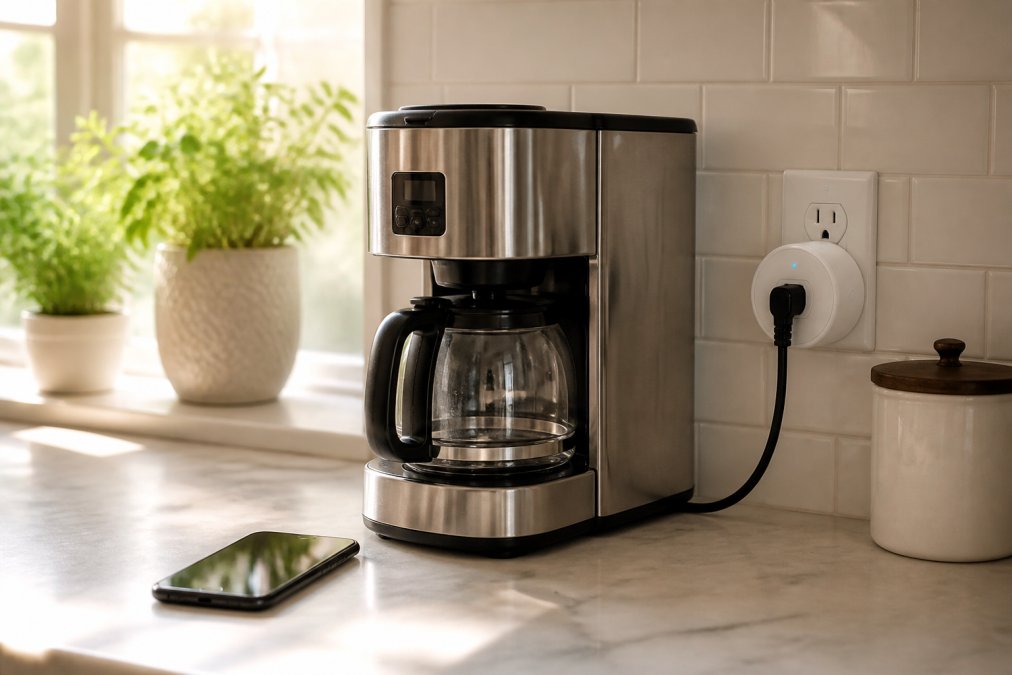
Most coffee makers have a "keep warm" mode and power on automatically when electricity is restored, making them ideal for smart plugs. Set your plug to turn on 10-15 minutes before you wake. Slow cookers work similarly: set ingredients the night before and schedule the plug to turn on at noon. Verify your appliance powers on automatically when electricity reaches it by checking the manual. Some appliances require button presses to activate; for these, physical button-pusher hardware is needed.
Integrating Voice Assistants with Your Kitchen Workflow
Voice assistants integrate with smart plugs through your smart home hub, letting you say "Alexa, turn on the coffee maker" instead of opening an app. Create routines like "Good Morning" that turn on the coffee maker, start the dishwasher, and adjust lighting with one command. Hands-free operation keeps your hands clean while cooking. Conditional automation like "When I arrive home, start the oven preheating" requires a smart hub but transforms your kitchen into a responsive space. Latency is typically 1-2 seconds, which is rarely problematic.
Smart Plug Kitchen Appliance Safety and Fire Prevention
Safety is paramount when automating kitchen appliances. Smart plugs add electrical components to your outlet, and improper use creates genuine fire risk. This section provides a systematic protocol for safe automation of heat-generating appliances.
Electrical Safety: Amperage and Circuit Limits
Standard residential smart plugs are rated for 15 amps maximum (approximately 1,800 watts). Exceeding this rating causes overheating, melting plastic, arcing, and fire risk.
Common kitchen appliances and their typical amperage:
- Coffee makers: 5-10 amps (safe for smart plugs)
- Slow cookers: 2-4 amps (safe for smart plugs)
- Instant Pots: 8-12 amps (safe for smart plugs, but verify your model)
- Toasters: 8-12 amps (safe for smart plugs)
- Microwaves: 10-15 amps (borderline; verify your model's rating)
- Electric kettles: 10-15 amps (borderline; verify your model's rating)
- Dishwashers: 10-15 amps (safe for smart plugs, but verify your model)
- Electric ranges: 40-50 amps (absolutely not safe; requires hardwired smart switch)
- Wall ovens: 40-50 amps (absolutely not safe; requires hardwired smart switch)
- Portable induction cooktops: 15-20 amps (exceeds standard smart plug rating; not safe)
Always check your appliance's nameplate or manual for amperage rating. When in doubt, contact the manufacturer or consult a licensed electrician.
Daisy-Chaining and Circuit Overload
Never daisy-chain smart plugs or plug them into power strips together. Cumulative amperage and voltage drop create fire risk. Instead, spread smart plugs across different outlets and circuits. Verify your circuit layout by turning off breakers one at a time and distributing plugs accordingly.
Unattended Operation and Heat-Generating Appliances
Scheduling heat-generating appliances while away requires careful consideration. Verify the appliance is designed for unattended use (most slow cookers: 8-10 hours; coffee makers: 1-2 hours; ovens: never unattended). Confirm it powers on automatically when electricity is restored. Set appropriate internal settings beforehand (e.g., "low" heat on slow cookers). Never schedule overnight, daytime operation only. Ensure 6 inches of clearance on all sides and verify water/fuel levels before scheduling. Install working smoke detectors in your kitchen and keep a Class C fire extinguisher accessible.
Appliance-Specific Safety Considerations
Coffee makers: Safe for automation; schedule 10-15 minutes before waking. Slow cookers: Safe daytime only (max 10 hours); never overnight. Instant Pots: Safe with caution; verify automatic pressure release; max 4-6 hours. Dishwashers: Safe; schedule during off-peak hours to reduce energy costs. Ovens and stovetop burners: Never automate; require human intervention. Microwaves: Safe but not recommended; rarely benefit from scheduling.
Inspection and Maintenance
Inspect smart plugs regularly for burn marks, melting plastic, unusual odors, or visible damage. Disconnect and replace immediately if damaged. Test connection stability monthly by verifying scheduled appliances turn on and off correctly. Investigate missed schedules or delayed responses (weak WiFi, outdated firmware, or failing plug) before relying on automation.
When to Avoid Automation Entirely
Never automate appliances with mechanical timers that cannot be overridden, appliances requiring visual monitoring, appliances with malfunction history, or appliances you don't fully trust. When in doubt, consult a licensed electrician or the manufacturer.
Retrofitting Older Appliances with Physical Button-Pusher Hardware
Physical button-pusher hardware retrofits older appliances that require button presses. A mechanical arm or solenoid extends to press the button when activated via app or voice command, then retracts. The motion takes 1-3 seconds and can be scheduled through a companion app or integrated with your smart home ecosystem.
How Button-Pushers Work and Their Limitations
Button-pushers work best for simple on-off buttons requiring a single quick press. They struggle with multi-step controls, pressure-sensitive buttons, recessed buttons, and buttons with variable resistance. Test compatibility before committing by mounting temporarily and running a test press.
Installation and Positioning
Mount the button-pusher near your appliance's button using adhesive strips, magnetic mounts, or brackets, no wiring or permanent modifications needed. Align the arm precisely with the button center; even 1/4 inch misalignment causes failure. Use adjustable mounting arms or swivel joints to fine-tune alignment. Power via nearby outlet or USB port.
Reliability and Wear Patterns
Button-pushers typically last 10,000-50,000 presses; kitchen exposure to dust and grease accelerates wear. Common failures include motor burnout, mechanical slippage, misalignment drift, and connection loss. Extend lifespan with monthly cleaning and inspection. Replace if the arm becomes sluggish or presses feel weak.
Cost and Comparison to Smart Appliance Replacement
Button-pushers typically cost between $30 and $150 depending on features and build quality. This is significantly less than replacing an old appliance with a new smart model, which often costs $200-$1,500 or more.
However, the total cost of ownership matters. A button-pusher that fails after 18 months requires replacement. A new smart appliance, while expensive upfront, typically lasts 10+ years with minimal maintenance. For appliances you plan to keep long-term, upgrading to a smart model may offer better value despite higher initial cost.
Button-pushers make sense for:
- Appliances you use infrequently and don't want to replace yet
- Rental properties where you cannot make permanent modifications
- Temporary automation while you plan a longer-term upgrade
- Niche appliances (specialty cookers, vintage models) where smart replacements don't exist
Button-pushers do not make sense for:
- Appliances with pressure-sensitive or multi-step buttons
- High-use appliances where reliability is critical
- Appliances you plan to keep for 10+ more years (smart replacement offers better long-term value)
Integration with Smart Home Ecosystems
Most button-pushers connect to your smart home hub via WiFi or Bluetooth. Once connected, you can schedule presses through your smart home app, create voice commands ("Alexa, start the slow cooker"), or bundle them into routines alongside other smart devices.
Interoperability varies. Some button-pushers work only with their own proprietary app. Others integrate with major platforms like Alexa, Google Home, or Home Assistant. Check compatibility before purchasing if you want voice control or routine integration.
Latency is typically 1-3 seconds from command to button press. This is longer than a smart plug (which responds in 0.5-1 second) but acceptable for most kitchen tasks. If you need instant response, a smart plug or smart appliance is a better choice.
The Appliance Wizard can help you evaluate whether button-pusher hardware makes sense for your specific appliance or advise whether upgrading to a newer smart model offers better long-term value and reliability.
Creating Automated Schedules and Routines
Once your smart plugs are installed and connected, building schedules is straightforward. Open your smart plug app and select "Create Schedule" or "Create Routine."
Most apps use a simple interface: pick the appliance, select the days, set the time, and choose the action (turn on or turn off). You can create multiple schedules for the same appliance. Your coffee maker might turn on at 6 AM on weekdays and 8 AM on weekends.
Routines go further by bundling multiple actions into one command. A "Morning" routine might turn on the coffee maker, start the dishwasher, and adjust lighting simultaneously. A "Leaving Home" routine could turn off all kitchen appliances and lock doors.
Test your schedules thoroughly before relying on them. Run a test cycle to confirm the appliance turns on at the right time. Verify that the app sends the command reliably. Small issues caught early prevent frustration later.
Seasonal adjustments matter. Your morning coffee time might shift between summer and winter. Update your schedules accordingly. Many apps let you duplicate and modify existing schedules, saving time.
Document your routines somewhere you can reference them. A simple list of "6 AM coffee," "12 PM slow cooker," "7 PM dishwasher" helps troubleshoot issues and onboard family members who need to use your automation.
Common Mistakes to Avoid When Automating Kitchen Appliances
The biggest mistake is automating an appliance that doesn't power on automatically. Some coffee makers require a button press to start brewing even after power is restored. Smart plugs can't solve this. Know your appliance's behavior before investing in automation.
Another common error is ignoring WiFi stability. Smart plugs depend entirely on consistent internet connection. If your WiFi drops frequently, your automation will fail unpredictably. Fix your WiFi before blaming the smart plug.
Overloading circuits is a real problem. Plugging multiple high-draw appliances into the same circuit through smart plugs strains the electrical system. Spread your plugs across different outlets and circuits.
People often forget to account for appliance settings. If your slow cooker defaults to "high" heat but you scheduled it for a 10-hour cook, your food might overcook or burn. Set your appliance to appropriate defaults before automating it.
Neglecting firmware updates causes connection problems and security vulnerabilities. Check your smart plug app monthly for updates. Install them promptly. Outdated firmware is the source of many reliability issues.
Not testing schedules before relying on them leads to embarrassing failures. You might expect hot coffee and find a cold maker because the schedule didn't activate. Always test new automation before depending on it.
Automating your kitchen appliance schedules saves time and reduces daily friction, but success depends on matching the right tools to your actual workflow. The Appliance Wizard team can help you select smart plugs, retrofit older appliances, and design automation routines that fit your home. Visit our showrooms in Marion or Carbondale to explore smart appliance options, or contact us online at www.theappliancewizard.com to discuss your automation goals. We'll ensure your setup is reliable, safe, and genuinely useful, not just another gadget collecting dust.
Frequently Asked Questions
What is the simplest way to automate kitchen appliances if they're not smart?
Smart plugs are the easiest entry point. Plug any non-smart appliance into a smart plug, then use the plug's app or voice assistant to schedule power on/off cycles. For appliances with mechanical buttons (like coffee makers), you can also use physical button-pusher hardware that attaches to the appliance. Both methods work with existing appliances and require no rewiring or permanent modifications.
Are smart plugs safe for all kitchen appliances?
Smart plugs work safely with most kitchen appliances, but avoid using them with high-wattage devices like electric ranges or ovens unless the plug is rated for that load. Never use smart plugs with appliances that have heating elements left on continuously, as this creates fire risk. Always check the appliance manual and the smart plug's wattage rating before connecting. For safety-critical devices, consult a certified electrician or contact The Appliance Wizard's technicians for guidance.
Can I automate my coffee maker with a smart plug?
Yes. Plug your coffee maker into a smart plug, then set a schedule in the plug's app to turn on 15 minutes before you wake up. The water in the reservoir heats and brewing begins automatically. For best results, fill the reservoir the night before and set the coffee grounds in the filter. Some coffee makers also offer built-in smart features, which integrate directly with voice assistants without requiring a separate plug.
What's the difference between a smart appliance and using a smart plug with a regular appliance?
Smart appliances have built-in WiFi and app control, offering more features like remote monitoring, energy consumption tracking, and pre-programmed cycles. Smart plugs simply turn power on and off, so they work with any appliance but offer less granular control. For most scheduling tasks, a smart plug is sufficient and more affordable. Built-in smart features shine when you need remote monitoring or detailed operational workflows, such as checking if the dishwasher finished running.